Home > FlexCMS Training Manual > Blocks > Menu Blocks

Menu Blocks

Posted: August 10th, 2005 @ 2:22pm
Blocks Management
This area allows you to Create, Edit and/or Delete existing blocks. Keep in mind that any edits made to the block will be immediately changed once the block is saved and will be viewable to those groups in Block Allowance instantly. In addition, once a block is deleted, it is removed instantly and cannot be retrieved, so please be careful when using the delete block. It is highly recommended that you create a backup of the block you want to delete before proceeding.
Click on the Menu Blocks link and you?ll then see the following (Figure 3):
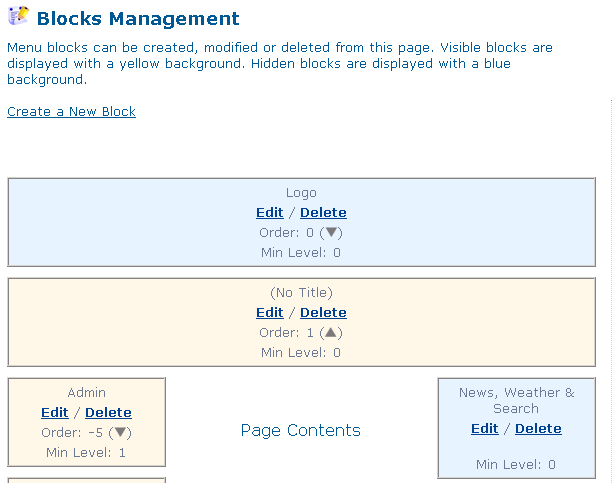 | Figure 3 |
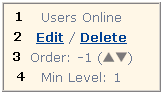
This area is your internal blueprint for how your site looks including the order the blocks appear. You change several options on each block from this area (Figure 4).
Block Legend
| | 1 | Block Title (optional field and fully editable) | | 2 | Click on Edit to view/modify your block contents | | 3 | The order in which your block appears, i.e. top to bottom. Negative numbers appear lower on the site than positive numbers. Click on the up or down arrows to change the block's position on your website/portal. | | 4 | Viewer Permission Level (0=Everyone, meaning everyone can view this block) |
|
Note: Depending on what template you use on your site, blocks may appear on the left and right hand sides and/or top and bottom of your site. Keep in mind that any changes made to blocks will be instant once submitted and can be seen by the Group(s) you assigned (Permissions Level), i.e. Everyone, Basic Member, etc.
|